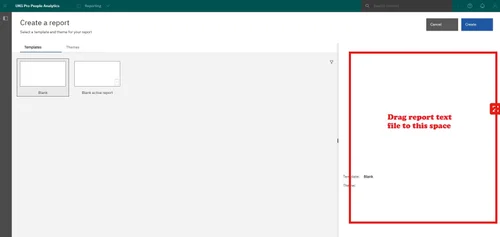
How to add a BI report from a text file to UKG Pro People Analytics
Instructions on how to use a text file in UKG Pro People Analytics
Open the file, select all and copy the text
UKG > Administration > People Analytics (Business Intelligence)
Open Menu
New
Report
Create
From the report toolbar, select More, then select open report from clipboard
Paste the report in the dialog box, then select OK
Select OK again after the message pops up
Save
Customize the report to change the employee type, employment status, etc. so that it meets the data criteria of your organization.
-or-
Open the file, select all and copy the text
UKG > Administration > People Analytics (Business Intelligence)
Open Menu
New
Report
Click the file from the folder and drag it into the whitespace on the right hand side.